
 The 5 optimization types
How article structure changes across the five optimization types (SEO, AIO, LLMO, GEO and Hybrid), a rough guide to choosing one, and how to set a default.
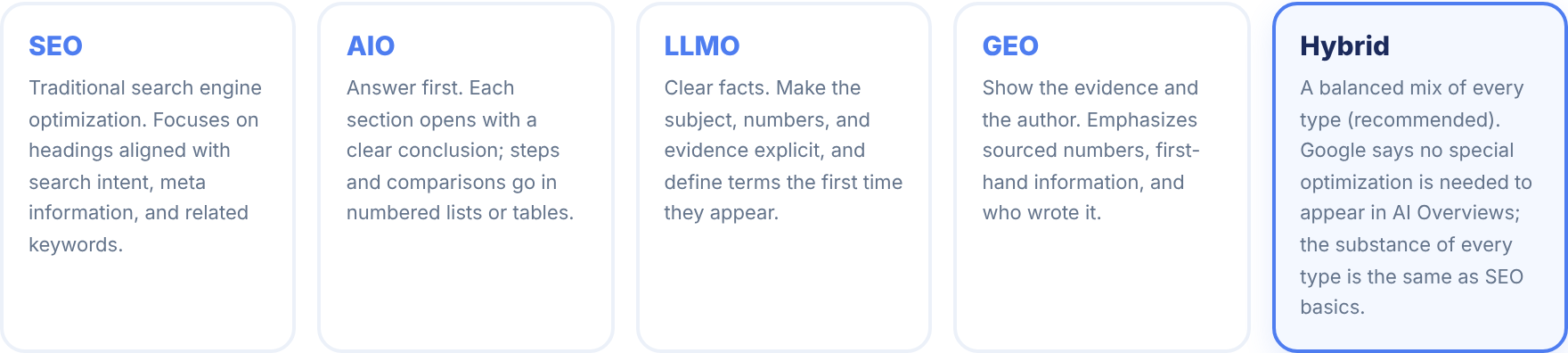
The type changes how the article is written
Even for the same keyword, the way to write changes depending on what you want to put up front. Sorabun sets conditions for each type, passes them to the AI that writes the body, and checks after writing whether they were met (since 2.134.0).
Three things change:
- The conditions for writing the body: for each type, the conditions in the table below are passed to the AI that writes each section
- The check after writing: when a condition is not met, the completion screen (the job's notices) shows which section is missing what. Publishing is not stopped (a person makes the fix)
- The summary box at the top: left out for the SEO type, included for the others
| Condition | What it means | Check | Used by |
|---|---|---|---|
| Answer first | The first paragraph of each section answers that section's question in 80 to 120 characters (no list, table, or H3 directly under the heading) | Reports sections with no answer paragraph (30 to 200 characters) directly under the heading. The summary and FAQ are not counted | AIO, Hybrid |
| Definition | A one-sentence definition of the topic ("X is ...") at the top, and technical terms defined where they first appear | Reports when the definition sentence is missing (not required when "Definition" is turned off in the settings) | LLMO, Hybrid |
| FAQ | Three or more questions readers often ask | Reports when there are fewer than three | LLMO, Hybrid |
| Sourced numbers | Numbers only from facts checked by search or from the referenced sources, with when and who published them | Reports when the body has three or more numbers but not a single source (References, or a link to another site) | GEO, Hybrid |
| Author | Show who wrote it | Reports when "Settings > Author and reviewer" is not registered | GEO |
The SEO type adds none of these conditions (a heading structure that follows the search intent, and answers to related questions, are the same for every type).
The article's skeleton (how many headings and in what order) doesn't depend on the type. It comes from the search intent and the research.
| Type | What it aims for |
|---|---|
| SEO | Focuses on a heading structure that follows the search intent, and on answering related questions. No summary box at the top. |
| AIO | Puts the answer first. The first paragraph of each section answers that section's question in 80 to 120 characters. After writing, it reports sections without an answer paragraph. |
| LLMO | States facts clearly. Always includes a definition of the topic, definitions of terms, and an FAQ. After writing, it reports a missing definition or FAQ. |
| GEO | Shows the evidence. Uses only numbers with a source, along with when and by whom they were published. After writing, it reports numbers without a source and missing author information. |
| Hybrid | Combines the AIO, LLMO and GEO conditions (recommended). Every type follows the same SEO basics, and Google says no special optimization is needed to appear in its AI features. |
Which type should you choose?
| When... | Use |
|---|---|
| You want to rank straightforwardly in search | SEO |
| Many readers want a quick answer ("what is X", "how to") | AIO (answer first) |
| You want to convey terms, mechanisms, and numbers precisely | LLMO (clear facts) |
| You want to lead with evidence such as research or your own data | GEO (show the evidence) |
| You're not sure, or want all of the above | Hybrid |
Google says there is no special optimization needed to appear in AI Overviews or AI Mode. The requirements are that the page is indexed and eligible to show a snippet. The types differ only in how an article is structured; whichever you pick, the substance is the same as SEO basics (helpful content with information found nowhere else). Producing an article for every variation of a search query is treated by Google as scaled content abuse, so Sorabun does not do that.
Setting a default
If choosing every time is a hassle, set a default under "Settings > Generation defaults > Optimization type" (default_type). Then on the New Article screen, you only need to change it when necessary.
Hybrid blends elements from each type in a balanced mix. It's practical to run with Hybrid at first, then switch to a specific type once you want to grow a particular traffic channel.