
 Creating your first article
The flow from entering a keyword to getting a finished draft
Try creating one article
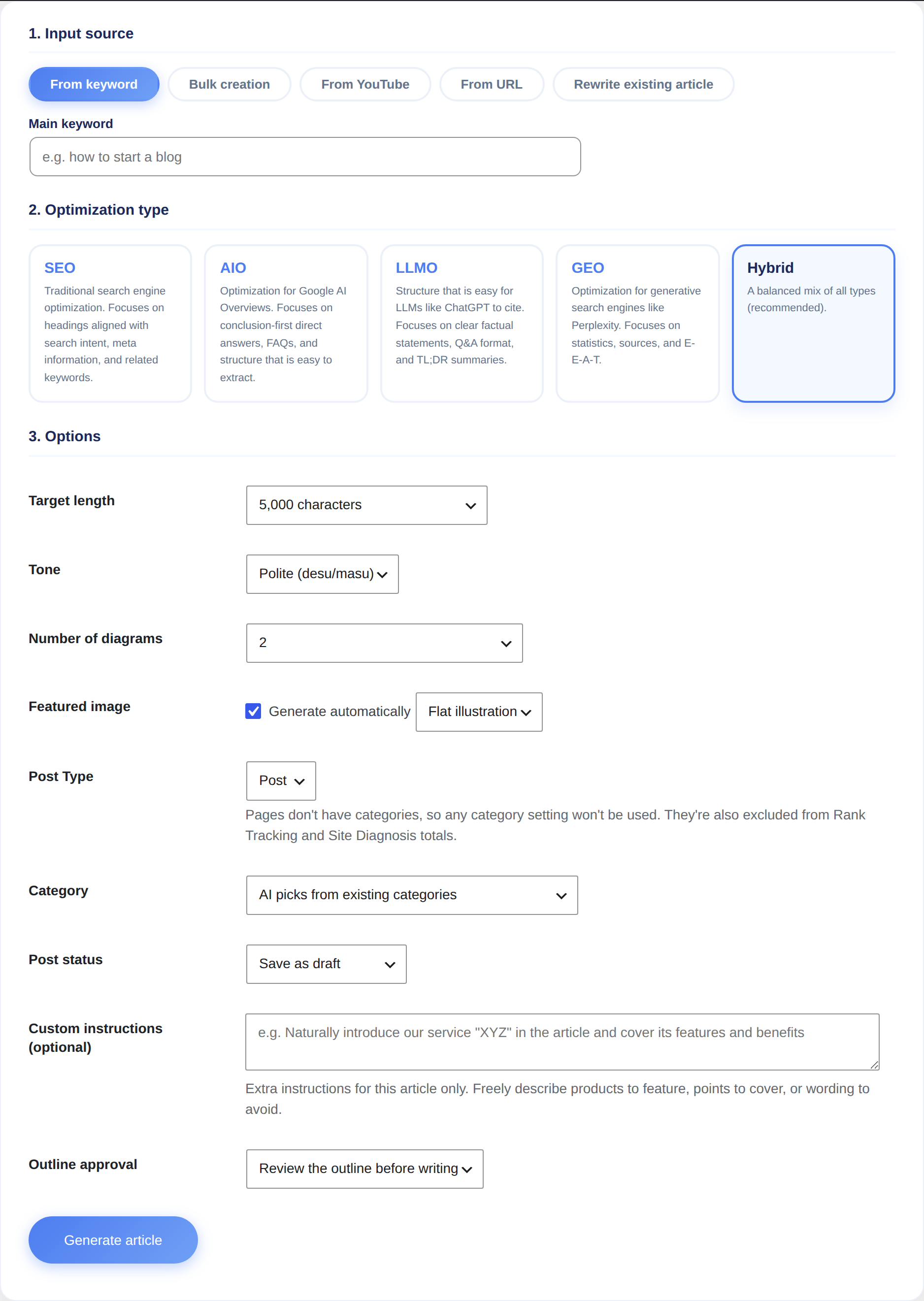
Open "Sorabun > New Article."
- Choose what to base the article on (keyword / YouTube URL / web page URL)
- Enter a keyword (for example,
hometown tax donation how to) - Choose an optimization type. If you're not sure, "Hybrid" is a fine choice
- Decide the character count, number of diagrams, and whether to include a featured image (you can also set all of these to "Leave it to AI")
- Press "Start generation"
Generation takes a few minutes. The progress bar moves through "Research → Outline → Writing → Images → Publish." Processing continues even if you close the screen.
Reviewing the outline before writing starts
Turning on outline review under "Settings > Generation defaults" pauses generation once the heading structure is ready. You can add, remove, or reorder headings before letting it proceed to writing the body, which prevents articles that miss the mark.
Proceeding without waiting for review
While outline review is on, an article isn't finished until you approve its outline. You can have outlines that sit untouched auto-approve after a set time.
Under "Settings > Generation defaults > Auto-approve outline" (outline_auto_approve), choose from 30 minutes / 1 hour / 3 hours / 24 hours (off by default).
You can also click "Approve as-is" on a pending row in "Jobs / History" to move straight to writing.
The finished article
By default, articles are saved as a draft. Review the content and publish it once you're satisfied.
Every article automatically includes:
- Body text that follows the heading structure
- A featured image (with the title text overlaid)
- Diagram images
- Links to related articles and internal links
- Structured data (JSON-LD)
AI-written text can contain factual errors. Always verify amounts, dates, laws, and anything related to medicine or finance against primary sources. Google doesn't reward "mass-produced auto-generated content with no human involvement."
Changing what the article is based on
- Keyword: builds an article from search demand. This is the most basic way to use Sorabun
- YouTube URL: transcribes a video's content into an article (Pro, requires the SUPADATA API)
- Web page URL: builds an article informed by the content of a reference page (Pro)
Creating a Page instead of a Post
Choose "Page" as the Post Type to create a Page instead of a Post. Use this when you want the AI to write pages you don't want listed in chronological order, like an About page, a price list, or an FAQ page.
The default is set in "Settings > Generation defaults > Post Type" (default_post_type). You can change it for each article on the article creation screen, so you can leave Post as your everyday choice and switch to Page only when you need one.
Choosing a Page changes the following compared to a Post.
- No category is attached. WordPress Pages don't have categories, so even if you specified one, it won't be used
- It isn't included in Rank Tracking, Site Diagnosis, or Duplicate Check totals. These only look at Posts
- CTA, Paid Article, and LINE Exclusive are still available for Pages (the same settings appear on the right side of the edit screen)
With automatic creation, such as Scheduled publish, AI Editor-in-Chief, or news articles, the result stays a Post regardless of your settings. This is so Sorabun can keep tracking its rank. Setting it to a Page would exclude it from Rank Tracking.
Checking progress and retrying
"Sorabun > Jobs / History" shows jobs that are running, complete, or failed. Failed jobs can be retried, and if a job had already made progress, it resumes from where it left off.
Stopping generation partway
Sometimes you realize partway through that "this isn't right." You can stop it with "Stop" on that row.
- It stops at the end of the current step, not the instant you click. Cutting it off mid-step would leave a half-written article or a half-finished recording behind (this is especially true for Podcast, where cutting off while the narration is being stitched together leaves it half-connected)
- Whatever article has been produced so far stays. Anything written that far is real content, so it's up to you whether to keep it or not (send it to the Trash from the Posts list if you don't want it)
- A stopped job shows as "Cancelled", which is kept separate from "Failed", since something you stopped yourself has no underlying cause you need to go track down
- Afterward, press "Retry" to pick up again from where it stopped
When you don't like the result
The same row has a "Regenerate with the same settings" button. Click it, and Sorabun makes another attempt with the exact same conditions as that job (keyword, optimization type, length, number of diagrams, and so on). You don't need to re-enter anything.
- The original article is left untouched. This creates a new article instead of replacing it
- The result stops at draft. Even if the original was set to publish, the new one stays a draft, since whether it's actually better is something to decide after reading it
- It uses AI API costs, so clicking the button shows a confirmation prompt first
Publish whichever one you like better, and move the other to the Trash.
You get a new article made with the same settings, not a rewrite that continues from the original in place. This is because a published article silently turning into something else would be worse.
If you only want to regenerate images, don't use this button. Use the "Regenerate Images" screen on Featured images and diagrams instead.