
 Preparing API keys
Which key you need for what, where to get it, and what stops working without it
At minimum, you need just one
Sorabun works with just one key for the AI that writes your article body. We recommend starting with Gemini, since it has a free tier and you can get a key without registering a credit card.
- Open Google AI Studio
- Issue a key with "Create API key"
- Paste it into the
gemini_api_keyfield under "Sorabun > Settings > API Keys" and save
Right below that field, the screen also shows how to check your own rate limit and how many requests Sorabun uses per article.
As of August 2026, Gemini 2.5 Flash offers a free API tier through Google AI Studio. The daily limit varies by Google Cloud project, and Google doesn't publish a fixed number (limits are set per project, not per API key). Check your own limit under "Active rate limits" in AI Studio, or see the official rate limits docs.
As a rough figure on Sorabun's side, one article uses about 10-15 requests. Compare that against your own limit to work out how many articles a day you can make.
Note that the "1,500 a day" figure on Google's pricing page is actually the free Search grounding allowance on the paid tier (on the free tier, Search grounding is capped at 500 a day, shared between Gemini 2.5 Flash and Flash-Lite). Neither of those is the normal API request limit, so don't confuse them.
On the free tier, what you send may be used to train the model. If you're working on client projects or articles that contain confidential information, we recommend switching to a paid, pay-as-you-go tier. Even after switching, it costs only tens of yen per article.
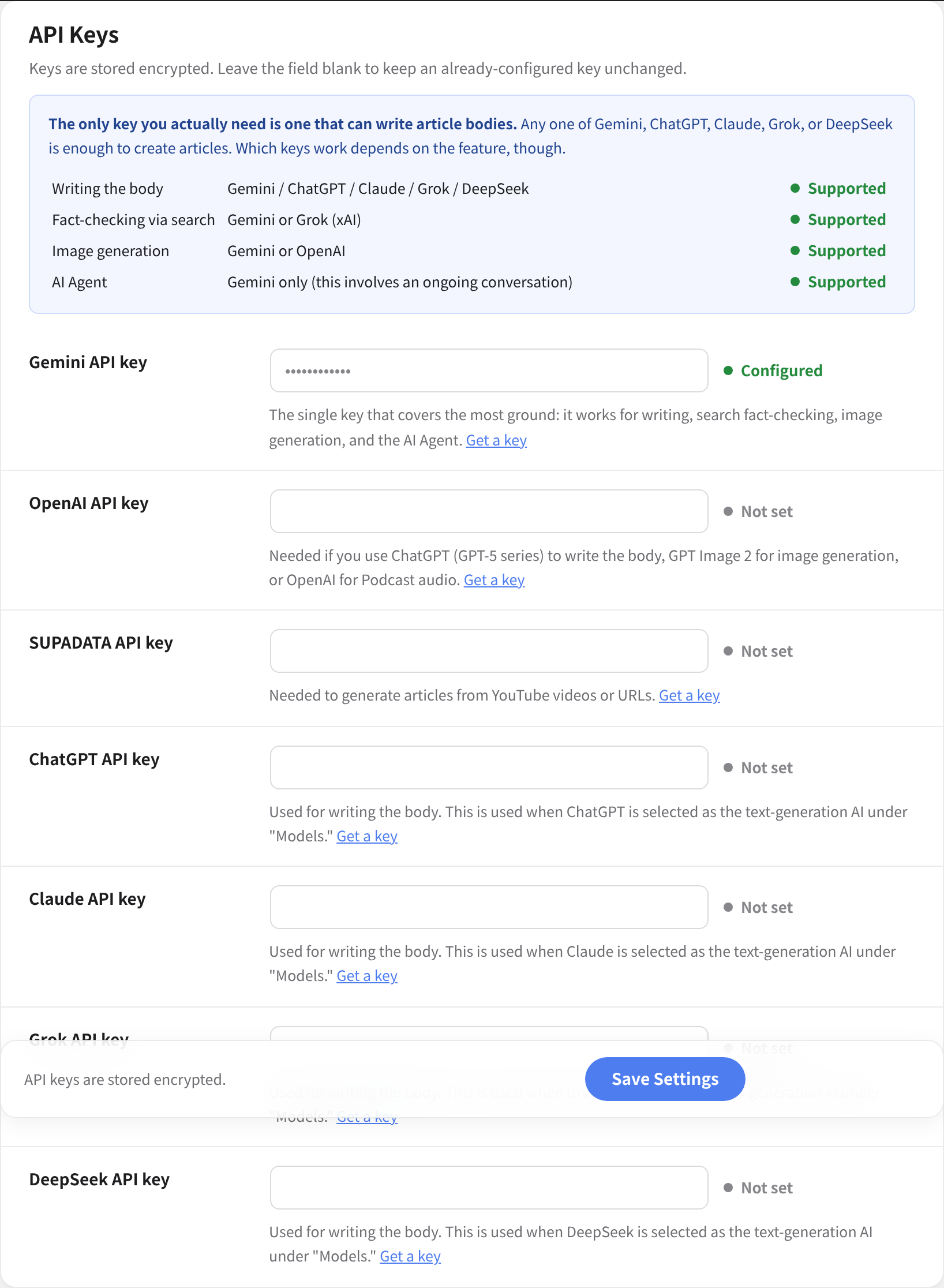
Keys by purpose
Only the first row is required. Add the rest as you start using each feature. A feature whose key you haven't entered just won't appear on screen, or won't do anything if you click it; it doesn't affect any other feature.
| What you want to do | Setting key | Where to get it | Without it |
|---|---|---|---|
| Write article body text | gemini_api_key / openai_api_key / anthropic_api_key / xai_api_key / deepseek_api_key | Each AI provider | One of these is required. Sorabun won't run |
| Generate featured images and diagrams | gemini_api_key / openai_api_key | Same as above | Articles are produced without images |
| Generate podcast audio | fishaudio_api_key (or openai_api_key) | fish.audio | The Podcast menu doesn't appear |
| Turn YouTube videos and URLs into articles | supadata_api_key | supadata.ai | "Create from URL" isn't available |
| Measure search rankings | serper_api_key / serpapi_api_key / gcs_api_key plus gcs_engine_id | Each provider | Rankings stay blank |
| View search volume | dataforseo_login plus dataforseo_password | dataforseo.com | The volume column doesn't appear |
| Insert screenshots | screenshot_api_key | screenshotone.com / apiflash.com | Just no image gets inserted |
| Auto-post to social media | X, Facebook, and Instagram keys | Each platform's developer portal | Nothing gets posted (see Social Media Auto-Posting) |
| Get notified when generation finishes | Slack webhook / chatwork_token | Slack / Chatwork | No notification is sent (see Notifications) |
| Sell paid articles | Stripe secret key | dashboard.stripe.com | Payments can't be processed (see Selling Paid Articles) |
| Cut down on spam contact submissions | captcha_site_key plus captcha_secret | Cloudflare / Google | Just no extra layer of protection is added |
| Measure page speed | psi_api_key | Google Cloud | Works even without a key (just a lower rate limit) |
| Quote related X posts | x_bearer_token | console.x.com | Just no quotes get inserted |
Some features don't need an API key at all. News search (Google News RSS), exchange rate lookups, and Search Console data via Google Site Kit all work without one.
Choosing the writing AI
Under "Settings > Model > Text generation AI" (text_provider), you can choose the AI that writes your body text from Gemini / ChatGPT / Claude / Grok / DeepSeek. Only providers whose key you've entered on the settings screen appear as options.
- Gemini: can fact-check against Google Search. This alone is enough to start with
- ChatGPT (OpenAI): writes with the GPT-5 series. Shares its key with image generation (GPT Image 2.5)
- Claude: good when you want strong long-form structure and natural Japanese
- Grok: good when you want real-time search across the web and X
- DeepSeek: good when cost is your top priority
When a new model comes out
Providers ship new models every few months. Set the model choice to "Recommended (follow new models automatically)" and your site moves over without waiting for a plugin update.
When a new model appears, we try it first and then switch the recommendation. Each site picks it up during its usual update check (every 12 hours), so no extra traffic and no extra settings. The model actually in use is shown under that field on the settings screen.
If you have selected a specific model, we never overwrite that value, because we cannot know why you chose it. Switch the field back to "Recommended" when you want it to follow along again. To pin a particular generation instead, pick that model from the list and it stops following.
When no recommendation has arrived (no connection, or nothing published yet), the site runs on the default model bundled with that version. Generation never stops.
Payment works differently for each provider
Knowing this before you get a key saves confusion. Except for Gemini, you have to add money before anything works.
| Where to get it | Payment | What you need to start | |
|---|---|---|---|
| Gemini | Google AI Studio | Free tier (pay-as-you-go beyond that) | A Google account only |
| ChatGPT | OpenAI Platform | Prepaid (minimum $5) | A card. ID verification too, for image generation (see below) |
| Claude | Anthropic Console | Prepaid (buy credits) | A card |
| Grok | xAI Console | Pay-as-you-go (requires registering a payment method) | A card |
| DeepSeek | DeepSeek Platform | Prepaid (minimum $2, PayPal accepted) | A card or PayPal |
ChatGPT (OpenAI)
- Sign in at platform.openai.com (you can use the same account as ChatGPT)
- Issue a key under "API keys" with "Create new secret key"
- Paste it into
openai_api_keyunder "Sorabun > Settings > API Keys"
Payment is prepaid. If you haven't bought credit first, you'll get an error even with a valid key. You can add as little as $5.
To generate featured images or diagrams with OpenAI (when eyecatch_provider is set to OpenAI), you need Organization Verification in addition to billing. You'll be asked to verify with a government-issued photo ID (a driver's license, passport, or similar).
This isn't needed if you're only writing text. Setting image generation to Gemini lets you skip this step entirely.
Claude (Anthropic)
- Log in at console.anthropic.com
- Issue a key under "Settings > API keys" with "Create Key"
- Paste it into
anthropic_api_key - Buy credits under "Settings > Billing"
Copy it right away and keep it somewhere safe. You can't see it again once you close that screen, so losing it means issuing a new one. This isn't specific to Claude; most providers work the same way.
Grok (xAI)
- Sign in at console.x.ai
- Register a payment method (you can't issue a key before doing this)
- Issue a key under "API Keys" and paste it into
xai_api_key
You don't need an X Premium subscription. The API works on its own. There's no permanent free tier, but joining the data-sharing program can earn you free credits.
DeepSeek
- Register at platform.deepseek.com with an email address or Google account
- Issue a key under "API Keys" in the left menu with "Create new secret key" (shown only once)
- Paste it into
deepseek_api_key - Add credit under "Top up" (minimum $2, PayPal and cards accepted)
Per-request pricing changes by time of day (off-peak is cheaper). This makes it a good fit for batch-generating articles overnight.
Podcast audio (Fish Audio)
For podcast narration, you choose between Fish Audio and OpenAI TTS. Fish Audio is the default, because its Japanese narration sounds natural, it's inexpensive, and you can register and use your own voice (voice cloning).
Getting a key
- Create an account at fish.audio
- Issue a key under "API Keys" in the dashboard
- Paste it into "Fish Audio API Key" under "Sorabun > Settings > Podcast Generation (TTS)" and save
Pricing is pay-as-you-go, based on the number of characters used. Check fish.audio's pricing page for current rates. You're only charged when audio is generated, so publishing an episode you've already made, any number of times, costs nothing extra.
Choosing a voice (voice ID)
Enter fish.audio's voice ID into "Voice A (main)" and "Voice B (for dialogue)."
- Open the page for the voice you want in fish.audio's voice library
- The alphanumeric string at the end of that page's URL is the voice ID
- Paste it into "Voice A." For a dialogue-style episode, paste a different voice's ID into "Voice B" as well
It works even if you leave these blank (Fish Audio's default voice is used). It's fine to generate one episode with them blank first, and set a voice later once you decide you want a different one.
On fish.audio, you can record and register your own voice, then have it read your text aloud. The voice you create also gets a voice ID, so you just paste it into "Voice A" the same way. This lets creators who don't show their face still put out a daily show in their own voice.
If you choose OpenAI TTS, it reuses your openai_api_key. There's no need to get a new key. The marin and cedar voices sound the most natural. See Podcast for more.
Turning YouTube videos and URLs into articles (Supadata)
This is used by the feature that pulls content out of videos and web pages to use as source material for an article. Get a key at supadata.ai and paste it into supadata_api_key. It has a free tier.
Without it, choosing "Create from URL" can't retrieve the content, so only that way of creating articles is unavailable. It doesn't affect normal generation from keywords.
Ranking and search data
Fetching rankings uses a SERP API. Set one of these under "Settings > Search Data Source" (search_provider).
| Setting key | How to start | How billing works | |
|---|---|---|---|
| Serper.dev (recommended) | serper_api_key | Start without registering a card | Prepaid. Buy more once the free tier runs out |
| SerpApi | serpapi_api_key | Sign up for a monthly plan | Monthly. Unused requests don't carry over to the next month |
| Google Custom Search | gcs_api_key plus gcs_engine_id | Get these from two separate places (see below) | Pay-as-you-go after the free tier |
Serper.dev (recommended)
- Create an account at serper.dev (no credit card registration required)
- Open the link in the confirmation email to sign in
- Get an API key from the dashboard and paste it into
serper_api_key
Just signing up gets you a free tier. You decide whether to add credit once you've used it up, which makes this the easiest option to try first.
Google Custom Search
You get these from two separate places. This is the only provider that splits into two steps, so follow them in order.
- Enable "Custom Search API" in Google Cloud Console, issue an API key, and paste it into
gcs_api_key - Create a search engine at Programmable Search Engine and turn on "Search the entire web"
- Paste the search engine ID shown there into
gcs_engine_id
Neither one works on its own. You need both before rankings can be fetched.
Search volume (DataForSEO)
This uses dataforseo_login and dataforseo_password. Note that you're pasting in a login ID and password, not an API key.
Signing up gets you a small test credit, but the minimum initial top-up for real use is fairly high (around $50). Search volume is more of a nice-to-have that makes your plans more persuasive, so it's fine to skip it at first. Retrieved values are cached for 30 days, which keeps costs down once you do add it.
Starting with the free Site Kit
Install and connect the free Google Site Kit plugin, and you can see impressions, clicks, and average position even without a SERP API. You can start without getting a single key, so this is the recommended way to get started with rankings. See Checking Search Rankings for more.
Screenshots
This is the feature that automatically inserts a screenshot of a target page, for articles introducing a tool and similar. Get a key from either ScreenshotOne (screenshotone.com) or ApiFlash (apiflash.com) and paste it into screenshot_api_key. Choose which one to use with screenshot_provider.
Both issue a key from their dashboard as soon as you sign up. Each gives you a free tier of a few dozen shots a month, so you can try it on the free tier first (ApiFlash lets you start without entering payment information at all). Sorabun only takes up to 3 screenshots per article, so the free tier goes a long way.
Without it, the article is still generated in full; it just won't have a screenshot inserted. See Screenshots for more.
Cutting down spam on the contact form (Turnstile / reCAPTCHA)
You can add a mechanism to the contact form that filters out submissions from bots. Under "Sorabun > Inquiries" settings (captcha_provider), choose either Cloudflare Turnstile or Google reCAPTCHA v3. The default is "none."
We recommend Turnstile. It's free, has no limit on the number of checks, and doesn't make visitors pick out images. reCAPTCHA v3 has a limit on how many free checks you get, and you're billed beyond that.
Getting a Turnstile key
- Log in to the Cloudflare dashboard (you can use this even if your site isn't moved to Cloudflare)
- Create a widget under "Turnstile" and register the domain where the form lives
- Paste the site key shown there into
captcha_site_key, and the secret key intocaptcha_secret
The site key is meant to appear on screen; the secret key must never be exposed. Swapping the two by mistake lets everything through unchecked, so watch out for that one thing.
If you choose reCAPTCHA v3 instead, you paste into the same two fields.
Sorabun has its own passphrase-based check built in, so submissions aren't let through unchecked just because neither Turnstile nor reCAPTCHA is configured. What you set up here is an extra layer on top. See Contact Form for more.
Measuring page speed (PageSpeed Insights)
This is used when the site diagnostics measure page speed (psi_api_key).
It works even without a key. Adding one raises the rate limit, so only bother getting one if you're re-measuring repeatedly.
- Enable "PageSpeed Insights API" in Google Cloud Console
- Create an API key under "Credentials"
- Paste it into
psi_api_key
It's free. No credit card registration is required either.
Quoting related X posts (Bearer token)
This feature quotes actual, currently trending X posts related to the article's topic in the body text (x_bearer_token).
The free tier that used to exist isn't available to newly created accounts. Using this now assumes you've bought credit (roughly $5 minimum), and requests fail without a balance. The developer screen has also moved from developer.x.com to console.x.com.
If you don't use this feature, it's fine to leave the key blank. With it blank, quoting simply doesn't happen; the article is still generated in full.
This is a separate key from social media auto-posting. Auto-posting requires creating an app and issuing four keys, but this is a single Bearer token used only for search. See Auto-Quoting Related X Posts and Social Media Auto-Posting for more.
Order to get them in
You don't need to gather everything at once. Adding them in this order means you never pay for something you don't need.
- Gemini: on its own, this covers both articles and images. Start here and stop
- Google Site Kit (a plugin, no key needed): lets you see rankings and traffic
- Run things this way for a while. Only add the next item once you feel something is missing
- Serper.dev: once you want to measure rankings yourself (you can try it without registering a card)
- Fish Audio: when you start a podcast
- Turnstile: once the contact form starts getting spam
- Supadata / Screenshots / DataForSEO / X: only once you've decided to actually use that feature
The prices and free tiers on this page are a summary of each provider's information as of writing. AI providers change their pricing often. Before signing up for anything, check each provider's pricing page for current rates. Screen names and button locations can also change at each provider's discretion.
About key storage
API keys are encrypted with AES-256-GCM before being stored in the database. Even on screen, a key you've already entered is shown masked and can't be read back out as-is.
You can also define keys as constants in wp-config.php. In that case they aren't stored in the database. The constant name is the setting key in uppercase, prefixed with SORABUN_, so the same pattern works for any key.
`` define( 'SORABUN_GEMINI_API_KEY', 'your key here' ); define( 'SORABUN_FISHAUDIO_API_KEY', 'your key here' ); ``
A field defined as a constant takes priority over the settings screen and can no longer be changed from there. Use this when you want to reuse the same key across multiple sites, or when you don't want keys included in database backups.
First, revoke that key from the issuing provider's dashboard. Deleting it from Sorabun's side leaves the key itself still active. After revoking it, issue a new key and paste it in to replace the old one.