
 Checking Search Rankings
Track the ranking of your registered keywords every day and follow how they change
Register a keyword, and it's measured every day
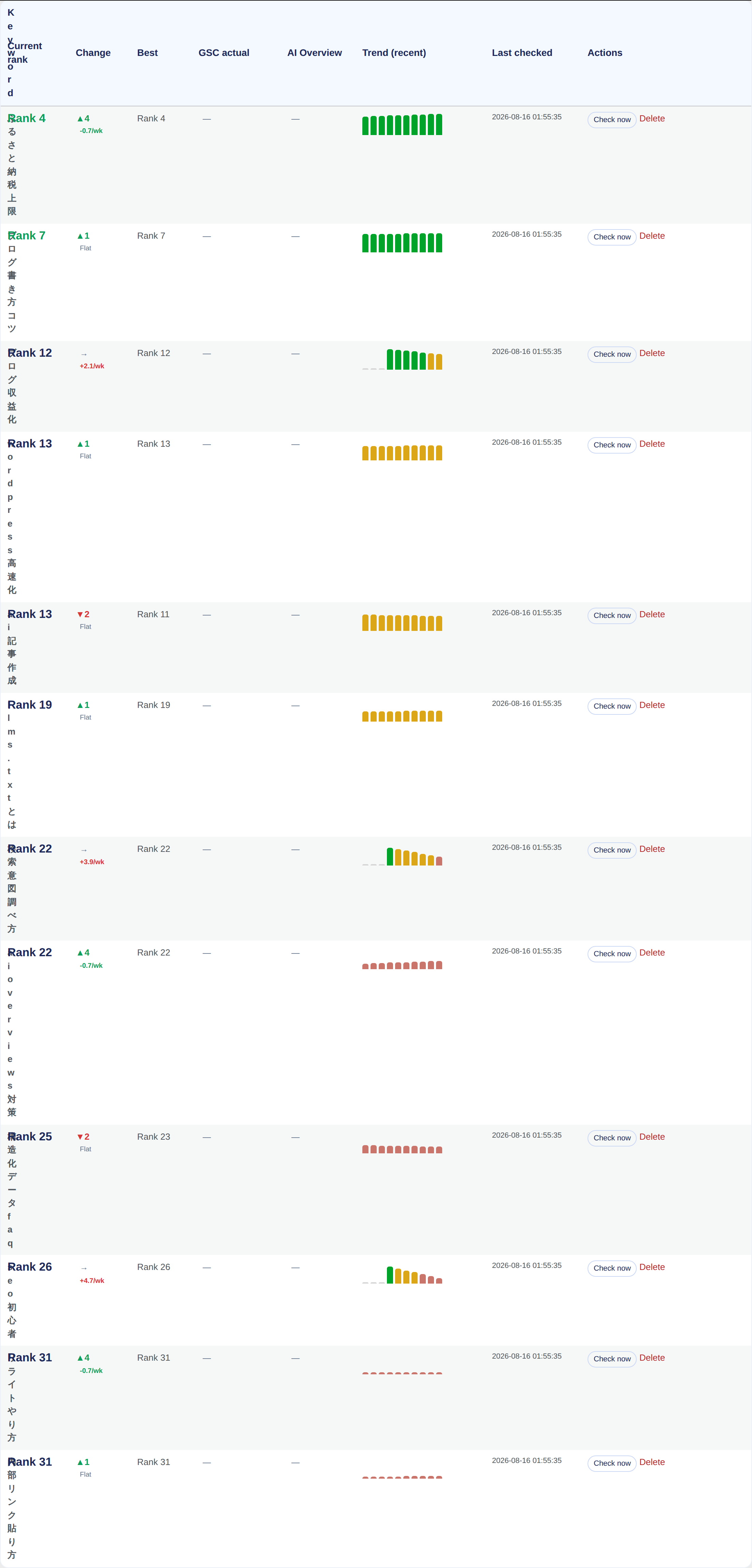
Register a keyword under the "Rank Tracking" tab in "Sorabun > Measure / Analyze," and Sorabun automatically measures its Google search ranking every day. You can see the change from last time, the best rank achieved, and the overall trend.
The "Change" column shows not just the difference from last time but also the slope across your entire history (how many positions you move per week). A day-to-day difference only tells you about a single up or down, so this lets you tell "it happened to rise" apart from "it keeps rising." The slope is calculated with a method that resists outliers (Theil-Sen estimation), so a single day that fell out of the rankings doesn't drag the line off course.
Whether You're Cited in AI Overviews
Alongside the rank check, Sorabun also records whether your site appears as a cited source in Google's AI Overviews (Serper.dev / SerpApi). This is read from the same API response, so it costs nothing extra.
The "AI Overview" column has three possible states.
- Cited: your site appears among the AI Overview's cited sources
- Shown: an AI Overview appears, but your site isn't among its sources. This is where to focus next. It's worth restructuring the article around a conclusion-first format (the AIO optimization type)
- None: no AI Overview appears for that search term
Above the list, a summary shows how many keywords you're cited for. This lets you not just write in a citable format, but check every day whether it actually got cited.
Whether You're Cited in Gemini's and ChatGPT's Answers (AI Citations)
AI Overviews can be read straight from the rank check response, but whether Gemini and ChatGPT cite your site as a source is something you can only find out by actually asking them. Click "Check AI Citations" on the rank check screen, and Sorabun asks that keyword to Gemini (with Google Search) and ChatGPT (with web search), then records whether your site appears among the answer's sources in the "AI Citation" column.
- Cited: your site appears among the answer's sources
- Not cited: sources are shown, but your site isn't among them. Hover over it to see who is cited instead
- No sources: the AI answered without citing sources (a question it didn't search for)
This costs a few yen to around 10 yen per check, so it isn't checked automatically by default. Turn on "Settings > Search Data Source > AI Citation Check" (ai_cite_enabled) and Sorabun checks it once a week, alongside your daily rank check. It only uses the AI services you've set up a key for (the Cloud edition uses both), and it keeps nothing but the citation mark and the source domains, never the full text of the AI's answer.
Required setup
Fetching rankings uses a SERP API. Set up one of the following under "Settings > Search Data Source."
- Serper.dev (
serper_api_key): Inexpensive. Recommended - SerpApi (
serpapi_api_key) - Google Custom Search (
gcs_api_keyandgcs_engine_id)
Choosing which one to use (search_provider)
The Search Data Source dropdown on the same screen decides where Sorabun goes to fetch rankings. The default is "Auto," and that's fine to leave as is.
"Auto" uses whichever keys you've entered, in the order Serper.dev, then SerpApi, then Google Custom Search. If you've only entered a Serper.dev key, that's what gets used. If you later add a SerpApi key too, Serper.dev still takes priority.
Only choose one manually in cases like these:
- You've entered both keys and want to use the one that isn't prioritized
- You've used up one service's free quota and want to switch to the other
- You want to narrow down why rankings aren't being fetched
Choose anything other than "Auto" and Sorabun will use only the one you specified. If you choose a service you haven't entered a key for, rankings won't be fetched even if other keys are set. The screen will show "Not configured."
Google Custom Search is scheduled to be discontinued by Google in January 2027. Don't choose it if you're just getting started. If you're already using it, we recommend moving to Serper.dev. Switching over is as simple as entering a key and going back to "Auto," and the ranking history you've measured up to that point stays intact.
Using real data from Search Console
Install and connect the free Google Site Kit plugin, and Sorabun can pull in impressions, clicks, and average position at no extra cost. These numbers are closer to reality than the SERP API's estimates.
Showing search volume
Set up a DataForSEO account (dataforseo_login / dataforseo_password) and Sorabun displays the monthly search volume for each keyword. Retrieved values are cached for 30 days, keeping API costs down.
Next steps
For articles whose rankings aren't improving, you can improve them from SEO Insights and Rewriting.