
 Screen list
The admin menu and each page's role, and the permissions each requires
Sorabun adds 38 pages to the admin screen (Pro edition).
| Screen | Page ID | Capability |
|---|---|---|
| Dashboard Lite/Pro | sorabun-dashboard | Author and above |
| Goals & Reports Lite/Pro | sorabun-kpi | Author and above |
| Getting Started Lite/Pro | sorabun-setup | Administrator only |
| Site Diagnosis Lite/Pro | sorabun-onboarding | Author and above |
| New Article Lite/Pro | sorabun-new | Author and above |
| LP Builder Pro | sorabun-lp | Author and above |
| SEO Advisor Pro | sorabun-consult | Author and above |
| Evidence Lab Pro | sorabun-evidence-lab | Administrator only |
| AI Editor-in-Chief Pro | sorabun-agent | Author and above |
| AI Director Pro | sorabun-director | Author and above |
| Rank Tracking Pro | sorabun-rank | Author and above |
| SEO Insights Pro | sorabun-insights | Author and above |
| Existing Article Audit Pro | sorabun-audit | Author and above |
| Technical Audit Pro | sorabun-tech | Administrator only |
| Internal Link Map Pro | sorabun-linkmap | Author and above |
| Link Checker Pro | sorabun-linkcheck | Author and above |
| SSL / HTTPS Pro | sorabun-ssl | Administrator only |
| Page Speed Pro | sorabun-pagespeed | Administrator only |
| Security / Speed Pro | sorabun-security | Administrator only |
| Activity Log Pro | sorabun-activity | Administrator only |
| Backup / Restore Pro | sorabun-backup | Administrator only |
| Migration Pro | sorabun-migrate | Administrator only |
| Inquiries Lite/Pro | sorabun-inquiries | Administrator only |
| Contact Forms Lite/Pro | sorabun-forms | Administrator only |
| Jobs / History Lite/Pro | sorabun-jobs | Author and above |
| Regenerate Images Lite/Pro | sorabun-images | Author and above |
| Image Studio Pro | sorabun-studio | Author and above |
| Schedule Pro | sorabun-schedules | Administrator only |
| Podcast Pro | sorabun-podcast | Administrator only |
| Social Auto-Post Pro | sorabun-social | Administrator only |
| CTA / Click Rate Pro | sorabun-cta | Administrator only |
| Paid Articles Pro | sorabun-paywall | Administrator only |
| Short Links Pro | sorabun-links | Administrator only |
| Read Rate / Heatmap Pro | sorabun-heatmap | Author and above |
| Templates Lite/Pro | sorabun-templates | Administrator only |
| Settings Lite/Pro | sorabun-settings | Administrator only |
| Upgrade to Pro Lite/Pro | sorabun-upgrade | Author and above |
| Global SEO News Lite/Pro | sorabun-seonews | Author and above |
You don't need to memorize screen names
Because related screens are grouped under a single menu item, some features don't appear by name in the menu. For example, "posting to X" isn't written anywhere in the menu (it's actually under Schedule / Social Auto-Post > Auto-post to SNS).
That's why the dashboard has "Find by what you want to do." Type what you want to do and the list narrows down.
| Type this | You get |
|---|---|
x / twitter | Auto-post to X (formerly Twitter) / resurface old articles on X so people read them again |
audio / podcast | Turn articles into audio and distribute them |
rank / ranking | Check search rankings |
api key | Enter or change an API key |
You can search using variant spellings, kana, or English. Features you've turned off in "Features to show" still appear in the list, marked "currently hidden" (and you can turn them back on from there).
The first time you use it
The dashboard shows a "Start here" section.
- Enter an API key: without this, no articles can be created
- Run Site Diagnosis: tell Sorabun once who your site is for and what it delivers (about 3 minutes)
- Create one article: just enter a keyword and a draft is created
Items disappear as you finish them, and once everything is done the whole guide stops showing.
Related screens are grouped under one menu item (Pro)
Because the number of screens grew too large, related screens are grouped under a single menu item, with top tabs to move between them. The page names in the list below don't map one-to-one onto menu entries.
| Menu | Pages reachable via the top tabs |
|---|---|
| Leave It to AI | AI Editor-in-Chief (article planning) / AI Director (improvement cycle) |
| Measure / Analyze | Rank Tracking / SEO Insights / Existing Article Audit / Technical Audit / Internal Link Map / Link Checker / Activity Log / Read Rate & Heatmap / CTA & Click Rate / Short Links |
| Security / Speed | Security / Speed / SSL / HTTPS / Page Speed (all administrators only) |
| Backup / Migration | Backup / Restore / Migration (both administrators only) |
| Inquiries | Inquiries received / Edit forms |
| Jobs / History | Jobs / History / Regenerate Images / Image Studio |
| Schedule / Social Auto-Post | Schedule / Auto-post to SNS |
Only the menu's appearance was consolidated. The page URLs haven't changed. You can still open a page directly, e.g. admin.php?page=sorabun-director.
This consolidation only runs in the Pro edition. In the Lite edition, the underlying pages don't exist, so the menu stays as-is.
You can remove unused features from the menu (Pro)
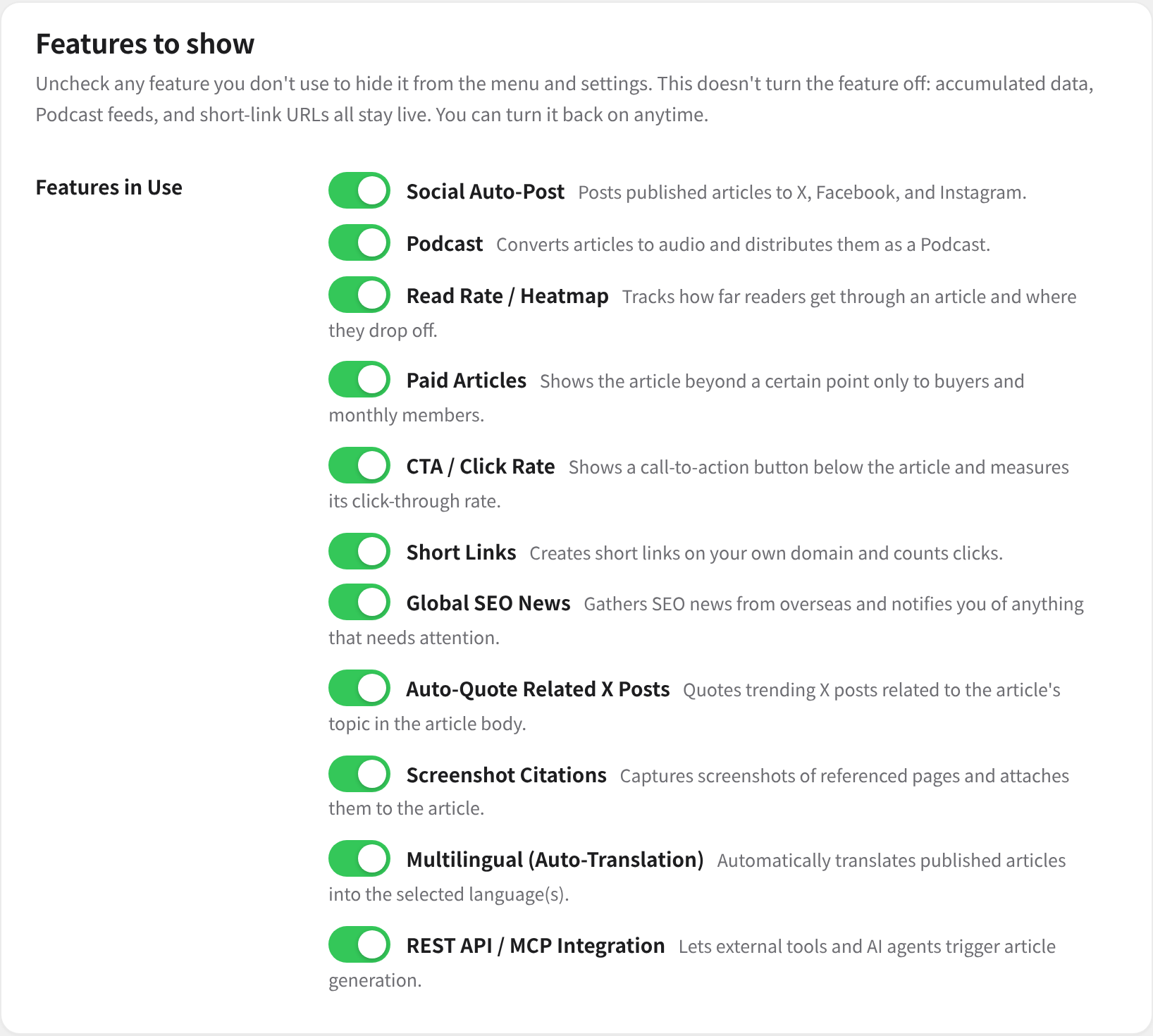
Almost no one uses every feature. If you don't distribute a podcast or post to SNS, having those items in your menu just gets in the way, so unchecking them in Settings > "Features to show" removes them from both the menu and Settings.
The following 10 features can be removed.
| Feature | What disappears |
|---|---|
| Auto-post to SNS | Menu |
| Podcast Distribution | Menu, and "Podcast generation (TTS)" in Settings |
| Read Rate / Heatmap | Menu |
| CTA / Click Rate | Menu |
| Short Links | Menu |
| Overseas SEO News | Menu |
| Auto-quote related X posts | "Auto-quote related X posts" in Settings |
| Screenshot quoting | "Screenshot quoting" in Settings |
| Multilingual (auto-translation) | "Multilingual" in Settings |
| REST API / MCP integration | "REST API / MCP integration" in Settings |
Unchecking a box doesn't stop the feature itself. The podcast feed (accessed by subscribed apps), short link URLs, and accumulated records all keep working. Your settings are preserved too, so re-checking the box restores everything.
To actually stop a feature, use the dedicated switch on its own screen (for example, "Don't auto-post" for Auto-post to SNS, or unchecking "Quote related X posts when generating articles" for related X posts).
The first time you update, Sorabun automatically decides which features to keep based on what you're already using. Features with settings or data stay, and features you've never touched are hidden. A notice at the top of the screen tells you what was hidden. This decision only runs once, so a feature you later removed yourself won't come back with each update.
About permissions
- Contributor or above: screens used by people who write articles
- Administrator only: screens involving the whole site, such as API keys or distribution settings
Communication with external services
Sorabun communicates with the following external services. Each one uses your own API key, and any feature whose key isn't set simply won't work.
- Google Gemini API (article generation, fact-checking via search, image generation): https://ai.google.dev / Terms: https://ai.google.dev/gemini-api/terms
- OpenAI API (image generation, text-to-speech, optional): https://openai.com / https://openai.com/policies
- Anthropic Claude / xAI Grok / DeepSeek (writing AI, Pro): any one of them can generate articles. Grok can also do real-time web and X search (pay as you go).
- SUPADATA API (YouTube and URL extraction, optional, Pro): https://supadata.ai
- Serper.dev / SerpApi / Google Custom Search (rank tracking, optional, Pro)
- DataForSEO (search volume, optional, Pro)
- ScreenshotOne / ApiFlash (screenshot capture, optional, Pro)
- Fish Audio (podcast text-to-speech, optional, Pro): https://fish.audio
- X API (searching related posts, optional, Pro, pay as you go): https://developer.x.com
- Google News RSS (news search, no API key needed, Pro)
- Slack Incoming Webhook / Chatwork API (completion notifications, optional, Pro)
- open.er-api.com (exchange rates, no API key needed)
- IndexNow(api.indexnow.org。公開・更新した記事のURLを Bing などの検索エンジンへ知らせる・任意・既定はオフ・APIキー不要)— https://www.indexnow.org / 送るのは記事のURLとサイトの確認用キーだけです
- Google PageSpeed Insights API(記事ごとの表示速度の計測・任意・Pro・自動計測は既定でオフ)— https://developers.google.com/speed/docs/insights/v5/get-started / 送るのは記事のURLだけです
- WebSub ハブ(pubsubhubbub.appspot.com・pubsubhubbub.superfeedr.com。フィードが更新されたことをフィードリーダーへ知らせる・任意・既定はオフ)— https://www.w3.org/TR/websub/ / 送るのはフィードのURLだけです
- S3 互換ストレージ(AWS S3・Cloudflare R2・Wasabi・Backblaze B2 など。バックアップの外部保存・任意・Pro・既定はオフ)— お客様ご自身のアカウントとキーで、お客様が指定した保存先へバックアップの zip を送ります