
 If something goes wrong
Common problems and how to isolate the cause
Article generation doesn't start
- Pro license not activated: check the status under "Settings > License Activation." Generation is blocked while it's unactivated
- API key not set: check that "Settings > API Keys" has a key for body text generation
- WP-Cron isn't running: if the site gets little traffic, processing may not advance. Reopening the admin screen can nudge it forward
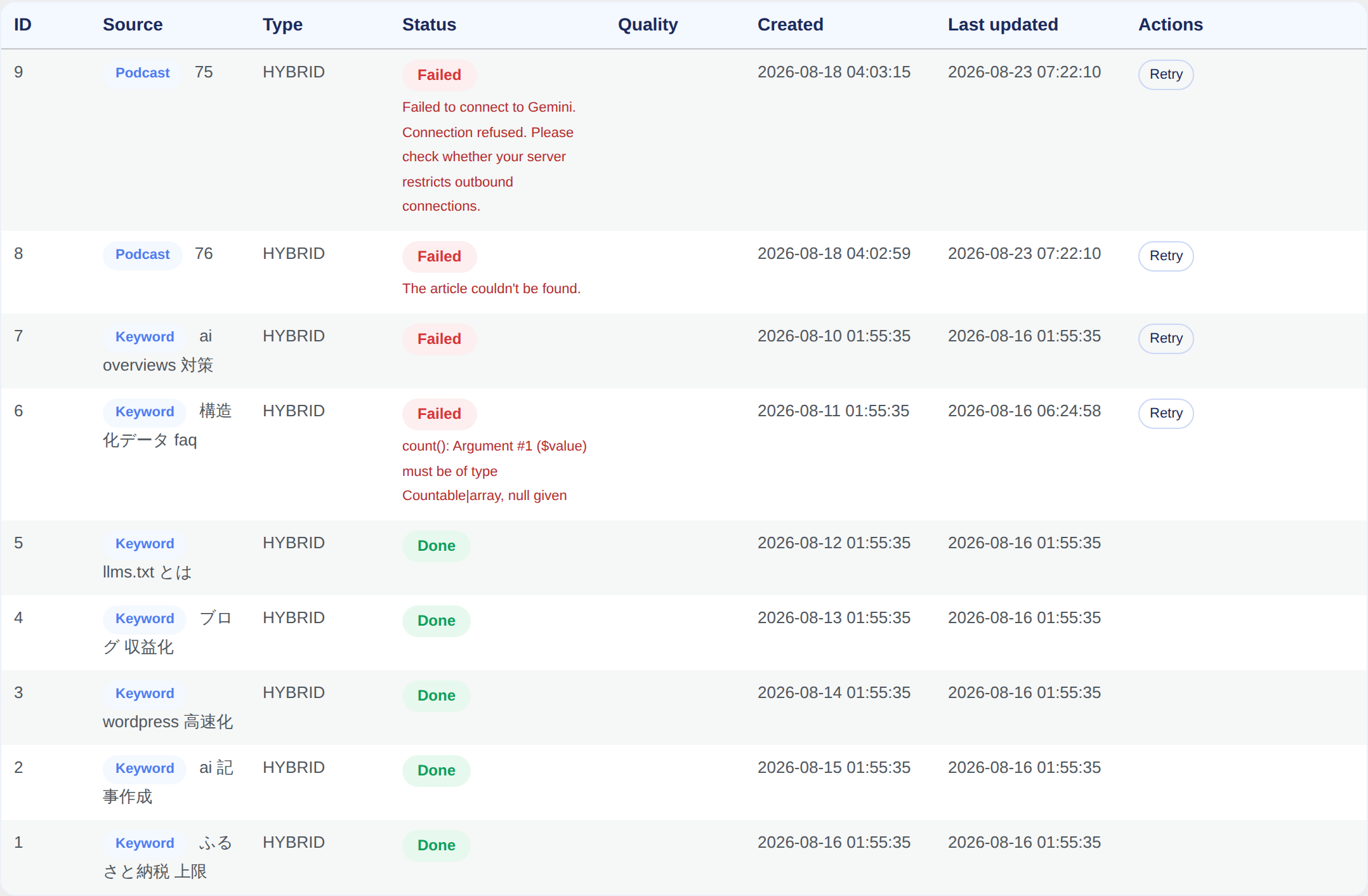
It fails partway through
You can see the error details under "Sorabun > Jobs / History." Common causes:
| Error | Cause and fix |
|---|---|
| 429 / rate limit | An API rate limit. You may have hit the free-tier cap. Wait a while, or switch to a paid tier |
| 401 / 403 | The API key is wrong or lacks permission. Re-enter the key |
| Timeout | The server's execution time limit. Reducing the character count or the number of diagrams can help it complete |
| Error during image generation | The image key isn't set, or the model name is incorrect |
Failed jobs can be retried. If a job had already made progress, it resumes from where it left off.
A job is stuck and won't move
If processing is interrupted by something like the server's execution time limit, it can appear to stop without even recording an error.
- Check the Last updated column in "Jobs / History." Jobs that haven't moved in over 10 minutes are flagged
- When a job is stuck, the screen shows the state of WP-Cron (whether it's disabled, and when it next runs)
- Each row's "Run to completion" button carries the job all the way through right there, without waiting for WP-Cron. You only need to press it once; the screen keeps advancing on its own until it's done (press it again to stop). Keep that page open while it's running
- It's also useful for checking whether cron simply isn't running in your environment: if "Run to completion" makes progress but the job doesn't move when left alone, the cause is WP-Cron
If a job keeps stalling at the same point, it automatically stops as a failure, with the cause and a fix written out.
There are around 10 steps for a single article, and one for every 5 lines of podcast narration, so a long episode could mean pressing it dozens of times.
v2.55.0 fixes two things. A single call now keeps advancing for as long as it fits within the server's execution time limit, and the screen itself also keeps advancing on its own until the job finishes.
We also added a lock so the two paths, WP-Cron and the screen's "advance" button, can't advance the same job at the same time. Podcast narration in particular is appended to a file, so if the two overlap, the resulting audio speaks the same part twice.
License activation fails
- The key format is
SRB-XXXX-XXXX-XXXX-XXXX. Check for stray spaces before or after it - Activation fails if you've used up your site slots. Deactivate an unused site from My Page
- Activation fails if your server blocks outbound connections
Icons or images don't display
From v2.6.1 onward, icons use SVGs bundled with the plugin. If they don't display, try clearing your browser cache (Ctrl + F5).
Article quality isn't what you expected
- Write specific instructions in Custom Instructions (Custom Instructions and Templates)
- Turn on outline review and fix things at the heading stage
- Try a different optimization type (The 5 optimization types)
- Setting character count to "Leave it to AI" produces a length that fits the search intent
If that doesn't solve it
Contact us via My Page. Including the error text from "Jobs / History" along with your WordPress and PHP versions helps us find the cause faster.